
Bear's Feed
Checking on code 2021 Edition
I was updating the Let's Encrypt cert and realized that my back-end code had failed to start... you would think that someone who has Ops and SRE skills would setup proper monitors... :)
That reminded me to run some Webmention Rocks! validations...
Test 1 Test 2 Test 3 Test 4 Test 5 Test 6 Test 7 Test 8 Test 9 Test 10 Test 11 Test 12 Test 13 Test 14 Test 15 Test 16 Test 17 Test 18 Test 19 Test 20 Test 21 Test 22
Update on life
Often life gets very busy and the time goes by until you suddenly realize that it's been a few months (years) since you last posted anything meaningful to the blog...
At CircleCI we grew the company and the Engineering division tremendiously, which included growing the SRE team - this meant I had to switch from being a Manager to being a Hiring Manager, a new role. It also meant that I was helping with the hiring for Engineering, Security and other teams. Oh and did I mention that this was across multiple time zones and in different countries :)
While that was going on we also were expanding the services, deploying to production the latest CircleCI code base which meant learning and using Kubernetes, Helm, Mongo, Postgres, RabbitMQ and many other tools. Some were new, some old - all of them updated and learned.
With a growing company you often run into issues from the growth, and we definitely did - but the people first focus at CircleCI meant that we were able to identify and plan for them. Part of that plan was to hire a VP of Platform as it became obvious to the management team that Engineering really needed to be split into the Product / Application group and a group responsible for the infrastructure Did you know that hiring a VP is very process oriented? Yea, it's intense and a glimpse I was glad to be a part of and I was also glad the company let SRE be a part of the selection as the new VP was going to be our new boss :)
Oh, and during all of the above we also were finishing our FedRAMP review and starting to plan for SOC2 - yikes! I also realized that there are better people than I for management and have moved back to being an Engineer and stopped being a Manager.
So yea, it's been a very busy 2 years. Don't even get me started on 2020 and the chaos bomb that is Covid - UGH
Validating Webmentions 2020 Edition
I was converting Ronkyuu to v3 Python only and realize that it has been quite a while since I looked at any of the Indieweb code or new tests!
Below are links so Webmention Rocks! can check my handling of webmentions.
Test 1 Test 2 Test 3 Test 4 Test 5 Test 6 Test 7 Test 8 Test 9 Test 10 Test 11 Test 12 Test 13 Test 14 Test 15 Test 16 Test 17 Test 18 Test 19 Test 20 Test 21 Test 22 Test 23
This section is testing the handling of updated webmentions
Update Test 1 Update Test 1 part 2
This test will update for a removed link - so the "Test 2 part 2" link will turn into text Update Test 2
Podcasting patent final victory
Finally the lame and bogus Podcasting Patent has been trounced!
Read about over on the EFF site
Adding a Privacy Policy
With all of the tech world working on being compliant with GDPR, which judging from the amount of emails i'm getting from vendors and third-party sites, is everyone - I decided to look into adding a privacy policy myself.
Knowing that the IndieWeb folks most likely have examples already in place, I headed over to there to look, and indeed found talk about it at Privacy Policy.
I also came across a conversation in the IRC channel about a recent addition to dgold's site where he includes some great ideas and examples of now to get Nginx to anonymize IP addresses even!
So I've gone an adjusted all my site generation templates to include a footer reference to my shiny new Privacy Policy.
Apple Phishing Email
I check all my emails for these things now but just in case others are not as paranoid, I wanted to post about this to share.
The email looked like it was from AppleID and had all of the font and styling that you expect from Apple, but when you viewed the source it quickly became obvious that it was a Phish attempt.
From: "=?utf-8?Q?AppIelD?=" <redacted>
To: "redacted" <redacted>
Date: Mon, 23 Oct 2017 16:13:16 +0200
Disposition-Notification-To: <redacted>
Return-Receipt-To: <redacted>
Subject: =?utf-8?Q?=5BStatement=20Update=20Report=5D:=20For=20?=
    =?utf-8?Q?your=20protection,=20your=20Apple=20ID=20is=20aut?=
    =?utf-8?Q?omatically=20disabled=2E?=
The unicode characters and the font choices hide a lot and in my email client it looked like
From: AppleID
To: "redacted"
Subject: [Statement Update Report]: For your protection, your Apple ID is automatically disabled.
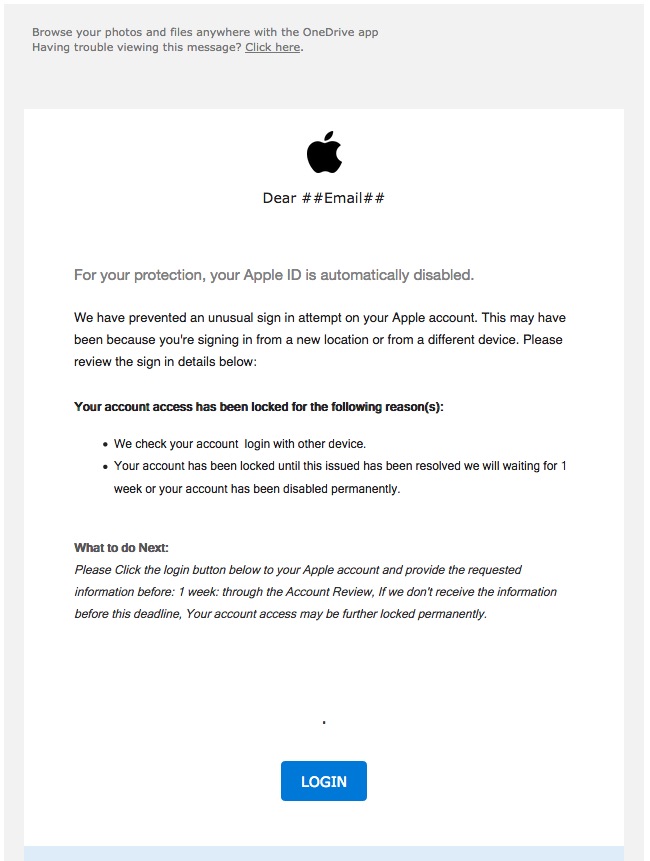 Apple Phishing Email
Twitter I fixed it for you
So Twitter is all happy with itself that they are (finally) expanding the maximum length of a tweet from 140 to 280...
big woop-de-doo
IndieWeb folk haven't had this issue for ages because we write our thoughts on our own sites and only use Twitter as a way to notify folks.
Checking Indieweb Code
It's been quite a while since I looked at any of the Indieweb code or new tests, so this post is to give things a once-over and see if anything needs fixing.
Below are links so Webmention Rocks! can check my handling of webmentions.
Tests that failed: - test 23
Tests that passed:
Snow
covering silence of snow
stillness quiets the mind
longing warms the heart
New year means new keys
The only New Years resolution I've ever made and follow each year is this - rotate your keys!
In the security realm long-lived keys are a bane - it allows any unknown comprimise to persist over time. In a perfect world we would be able to have keys with very very short lifespans, but unless that is very automated it can become a chore - and any security practice that is onorous will become one that is skipped.
Instead what I do for most of my keys is rotate them yearly, the exception to my rule is my Ops related keys, those are rotated much much more often than yearly. I'm talking about things like personal servers and the like as the holiday break is a good time for these types of personal infra cleanups.
My process for rotation involves a research step and then the implementation step.
First I take a few minutes to review the best practices to see if anything new has changed and my goto place for that is the Mozilla InfoSec wiki. Which is where I double check my nginx config but also my sshd config.
Once I have those notes I rename/move all of my current keys to "backup" names and then generate new keys for GitHub, personal servers and my local Git server. Having the old keys around in backup form allows me to still be able to get into the servers that I invariably forget I needed (or had) access to, not to mention that you do need the old key long enough to update a server to the new one ;)
ssh-keygen -t ed25519 -f ~/.ssh/name_of_new_key
That's it - nothing fancy or complicated, just a good simple process to help make things less easy for hackers.
A good writeup on what the latest SSH keytypes are and their adoption: https://chealion.ca/2016/06/20/ssh-key-types-and-cryptography-the-short-notes/
My 2017 IndieWeb Commitment
Each year some of the IndieWeb folk make a commitment to launch a new feature or item on their personal sites by the start of the new year, here is the current 2017 list.
My list this year will be to close the loop for posts-replies by implementing a simple Twitter feed page where I can view my Twitter feed and then POSSE replies or new posts.
This will need me to do:
- Create a python-twitter agent that gathers the twitter feed and generates a Kaku event
- Create a template for the twitter posts that allow for replies to be created for a Twitter post
- Create a new post event in kaku that allows for POSSE
The good thing is that most of this may be implementable using the micropub endpoint work I was working on earlier!
time to get coding!
Micropub accepted as a Candidate Recommendation
Congratulations to Aaron on getting Micropub as a CR (Candidate Recommendation)!
It makes me very happy to see something that came from the Indieweb community start to become a standard, it means the community is working together to ensure implementations are functional and useful!
IndieWebCamp NYC2
The second New York City IndieWebCamp is fast approaching and i'm hoping I will be able to make it but i'm still going to RSVP yes to
Kaku now supports Micropub via JSON
I was in need of some serious distracting today and I also wanted to get my Micropub handling within Kaku cleaned up and further tested because I just know that Aaron will soon have Micropub Rocks! active soon.
So yea, after about 6 hrs of refactoring and thinking and testing... Kaku now supports:
- Micropub CREATE using old-school params
- Micropub CREATE using JSON
- Micropub UPDATE (replace) using JSON for content
Soon I'll have UPDATE (replace) working with other fields and also UPDATE (add|delete).
Also need to look into DELETE now - gotta go read the specs...
Thoughts on what is normal
Thoughts on what is normal
I'm back from a week in West Virginia which started as a visit to see how my dad was doing after his recent heart attack and then quickly turned into what Carolyn, the lovely lady who was taking care of him, calls an "adult panties" event. His health quickly declined and we decided that Hospice care was required and then two days later he passed in his sleep.
I'm wanting to do a proper post about my dad soon, to be honest I'm still dealing with all of the "adult panties" required activities that being the executor of his will requires -- also I'm just not handling it well so i'm not handling it at all :/
Normal used to be me watching multiple online feeds and streams, clucking and shaking my head at the silliness and absurdity of how folks act, and working on keeping my small part of the internets sane and comfortable for others.
In the part of West Virginia where my dad retired you are lucky to get cell coverage at all. My carrier plan had me roaming so data coverage was not found. My dad also didn't need or want wireless so his fast internet-via-cable was useless.
This meant that I spent my week away from tech and the subsequent turmoil and/or drama -- something which I (re)discovered was very calming ... except for what I was having to do :/
I'm extremely grateful for the family that adopted my dad and then myself and my brother as they were so warm and thoughtful and caring the entire time, hugs and pokes to Carolyn, Brad, Jennifer, Sam, Jesse and Jessica.
I'm already missing them mightily and we are all missing my dad terribly.
I'm glad I was able to be there for his birthday and give him a big hug and say that I loved him.